AI Agent for an HR Service: How to Connect an External LLM Without Leaking Sensitive Data
In this article I'll describe how I designed and built an AI assistant for the company's HR service. The AI assistant searches for answers in company documents and databases, and also answers general questions unrelated to work. It works on a two-pass scheme with a classifier, and it does not send sensitive data to the external LLM.
Task: add an AI assistant to the HR service
The task's customer was the HR department. My colleagues asked to add an AI assistant to the existing HR service. The main goal was to increase employee loyalty: provide support regarding internal regulations, simplify searching through internal documents and reference materials, and give access to AI from the company's internal resource.
As a result of discussions with HR, we formed the requirements:
-
Search through the company's internal documents. An employee asks "how to arrange a vacation," "where to get an application form," "what is the procedure for approving training," and gets an answer based on regulations and reference materials.
-
Search across departments and employees. So that a person can find the email and phone number of a department or employee.
-
Answers to general questions. If an employee asks something not about work, for example: "how to cook pancakes," "the capital of Cambodia," etc., then the AI should correctly answer such questions.
-
Reaching out to a live HR as a fallback option. If the question is about work but there's no answer in the documents, the assistant offers to write to the HR manager through a form.
Constraint: external LLM and sensitive data
The answers were to be generated by an external LLM. And that means everything users send to it physically leaves the company for someone else's servers. It was important to filter or mask sensitive data that could be in users' requests or in the context for the LLM.
LLM (Large Language Model) is a type of neural network trained on huge volumes of text to predict the next word in a sequence.
Solution: deploy RAG, filter the input, don't send some requests to the LLM at all
Everything that goes to the LLM is de-identified beforehand. In a request, a user may write an employee's first and last name for a search, and that's personal data. Therefore the user's request passes through a filter that finds names and replaces them with placeholders (NAME_1, NAME_2) before the text goes to the neural network.
Contact search is performed programmatically, outside the LLM. Employees' contacts are the most sensitive data, and they cannot be given out. Therefore the LLM here works only as a classifier: it understands that the person is looking for a contact and returns to the HR service a command to perform a search through the directory. The search itself and the delivery of contacts are performed by another program, not connected to the LLM.
For documents I deploy RAG. To answer based on internal materials, I prepared a search index. Documents and FAQ are vectorized and placed into a vector database. If a user has a question about documents, then relevant fragments are first found in the vector database and then passed to the LLM as context. The neural network answers strictly based on the found documents.
FAQ (Frequently Asked Questions) is a section with frequently asked questions and ready answers to them.
RAG (Retrieval-Augmented Generation) is a technology in which a language model, before answering, searches for the needed information in an external knowledge base and generates an answer based on it. The base is usually a vector store, for example, Qdrant. The source documents are split in advance into small fragments — chunks. Then each fragment is converted into a multidimensional vector using a special embedder model. All vectors are saved in the base. When a user asks a question, it too is translated into a vector, and the system searches for vectors mathematically close to it — that is, the fragments most similar in meaning. The found fragments are passed to the language model together with the question, and it forms an answer relying on them.
Backup by a live HR. If the question is corporate but there's no answer in the documents, the assistant honestly says it didn't find one and offers to write to HR through the feedback form.
For loyalty — we answer all questions and generate images. General questions go to the LLM as is: they contain no corporate data, there's nothing to de-identify, and it answers from general knowledge. Additionally, I added image generation — an employee can ask to "draw a cat," and the agent will generate a picture.
Data sources
The agent has three sources from which the answer comes:
-
The LLM itself — for general questions unrelated to work. Here the source of knowledge is the trained model; corporate context is not needed.
-
FAQ — a table of ready "question-answer" pairs in the NocoDB service. It is maintained by the HR manager. Frequent questions that need a verified answer go here.
-
Documents (RAG) — regulations, forms, reference materials. They are kept in file storage, and their metadata — in the NocoDB table service. The content is indexed into the Qdrant vector database using the open source model multilingual-e5-large.
The agent searches FAQ and documents in a single request across all of them at once, without choosing the source in advance — the answer may turn out to be in any of them.
Implementation: a two-pass scheme
For each question the agent, using a two-pass scheme, decides how to answer. The first pass (Pass 1) is the classifier: it chooses a tool — a tool call. The second pass (Pass 2) forms the answer.
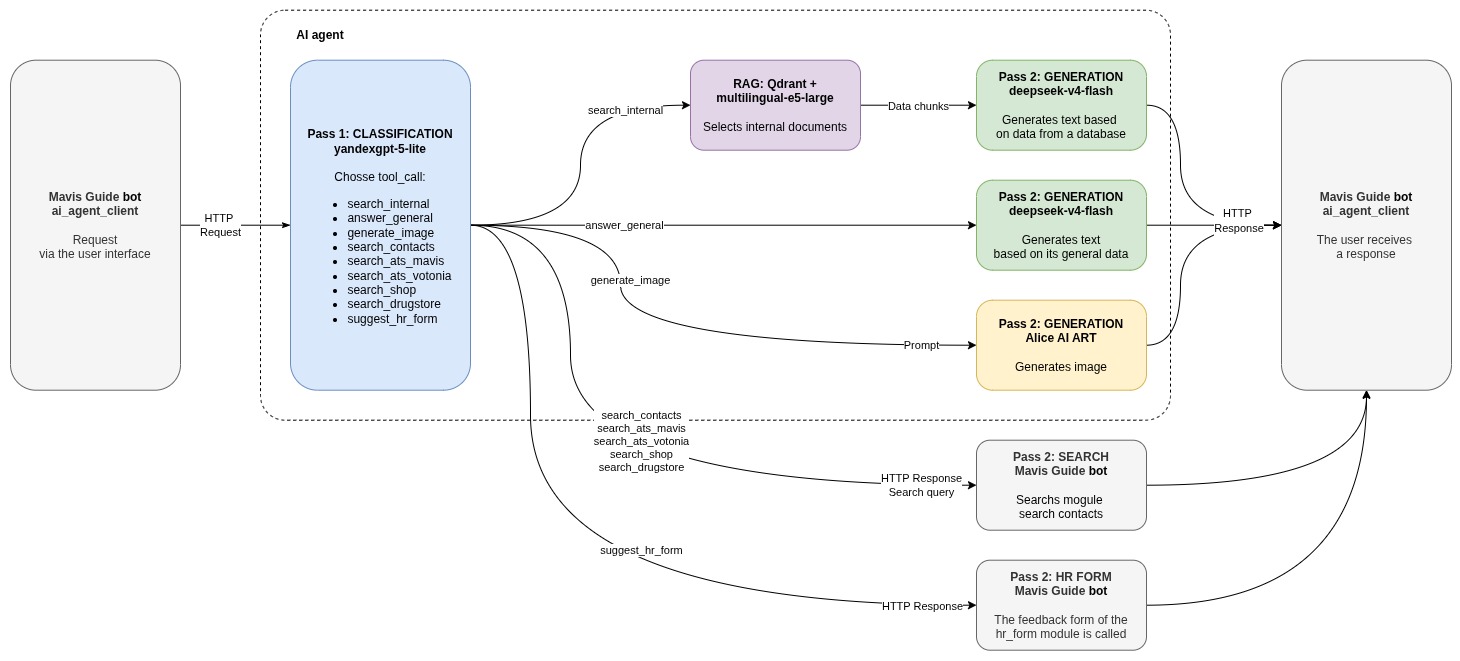
Tool calls the classifier can respond with at the first step:
-
Search in internal sources (search_internal) — searches through the prepared FAQ table and documents.
-
Search command (search_contacts, search_ats_mavis, search_ats_votonia, search_shop, search_drugstore) — the agent returns an instruction to perform a search through the directory and passes the search string. Then the search is performed programmatically, without the LLM's participation.
-
General answer (answer_general) — if the question isn't about working at the company, the LLM answers from general knowledge.
-
Image (generate_image) — generates an image from text via Alice AI ART.
-
HR form (suggest_hr_form) — if nothing was found for a corporate question, the agent offers to reach out to a live HR.
Dialogue context through Redis
For the LLM, each request is new; history is not pulled in automatically. So that the assistant understands clarifying questions, for example, "and where to find him?" after the previous answer, memory of the dialogue is needed. For this, the history of the user's correspondence is written to Redis. Then, on each request, the history is passed to Pass 2, so that the neural network answers taking the context into account.
Document indexing
Corporate documents are kept in file storage, and the search is performed against a vector database. To convert text documents into multidimensional vectors, indexing is needed.
Indexing works like this. The administrator maintains in a NocoDB table a list of documents that need to be indexed and puts the documents themselves in file storage. The AI agent takes the list of documents, downloads them from storage, and also retrieves the FAQ. Then the indexer goes through the FAQ records and documents in storage, turns the text into vectors, and puts it all into Qdrant. The indexing is incremental: for each record, the modification date in NocoDB is compared with the date when it was indexed. If the record hasn't changed — it's skipped.
Separately, the synchronization task is solved: if a record was deleted or renamed in NocoDB, the old vector needs to be removed from Qdrant, otherwise "ghosts" will accumulate — references to nonexistent documents. After the update cycle, the indexer reconciles what actually exists in NocoDB with what lies in Qdrant, and deletes the excess.
Architecture
Schematically, the service is structured like this:
.jpg)
The HR service — receives the request from the user and calls the AI agent over HTTP at POST /api/v1/ask. The contract between the HR service and the AI agent is described in docs/openapi.yaml.
The external LLM — Yandex AI Studio as the main provider and GigaChat as the backup. The LLM client is abstracted: to switch to another provider, it's enough to rewrite a single client module, while all the rest of the logic remains untouched.
RAG — Qdrant as the vector database and the local embedding model multilingual-e5-large.
NocoDB — tables with FAQ and document metadata; the files themselves are kept in file storage.
Redis — stores the history of correspondence with users.
Technology stack
-
Python 3.12 — the main language.
-
FastAPI — the web framework for the agent service, with endpoints and validation of requests and responses via Pydantic.
-
Qdrant — the vector database for RAG.
-
Redis — storage of dialogue history.
-
multilingual-e5-large — the local embedding model for vectorization.
-
Docker Compose — build and run of the whole stack.
Compatibility and development
The agent is designed so that individual parts can be replaced without rewriting the rest. For example, the LLM provider is changed by rewriting a single client module. The business logic — classification, RAG, de-identification — does not depend on which neural network is under the hood. The vector database or the embedding model can also be changed — they are written in a separate layer.
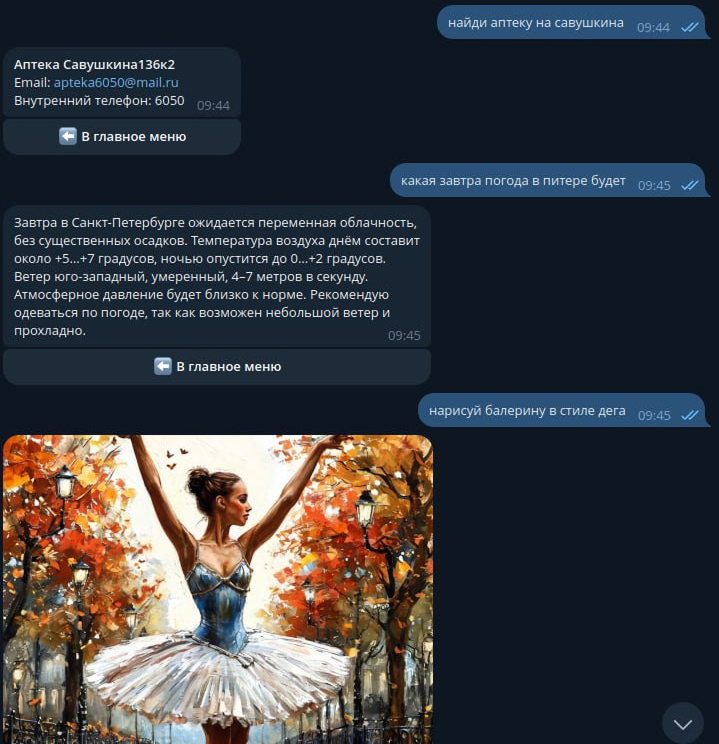
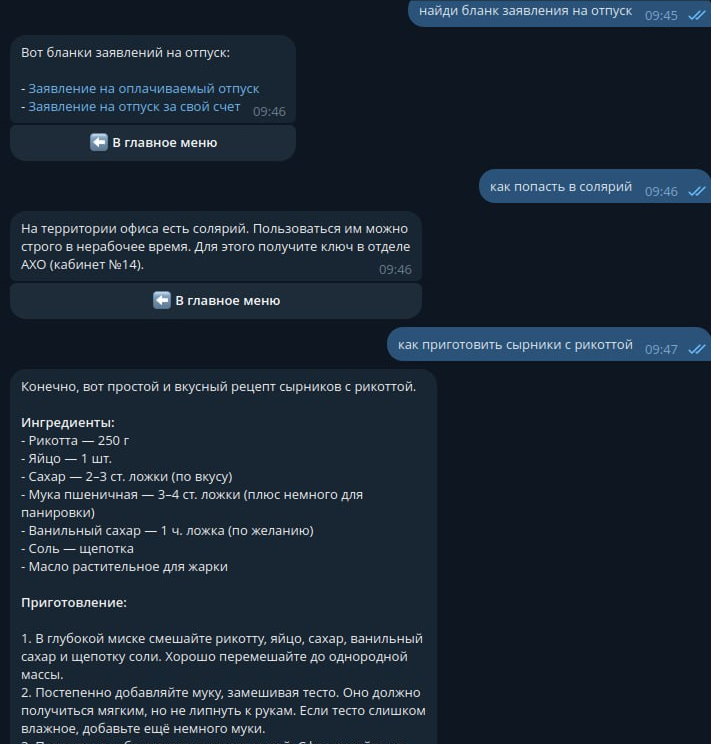
Demonstration
👉 Earlier I wrote about developing a service for the HR department.