A Spreadsheet as a CMS: How to Manage Chatbot Content from an Ordinary Table
We launched an internal HR service for employees in the form of a Telegram bot. This service publishes news and information about working at the company, sends notifications and surveys to users. Content is managed by an HR manager through the spreadsheet service Seatable. Meanwhile, the bot's Python code doesn't change — the Seatable table works as the site's admin panel.
Task: flexibly manage the bot's content without a developer
The HR service required content management to be as simple as possible and to not require a developer's involvement. Ideally like this: the IT department develops the solution, hands it over to the HR department, and then HR can edit the content on its own.
As a result of discussions with the HR department, we formed a list of requirements for the service:
- Updating content without deployment or code changes.
- The ability to add new menu sections of any nesting depth — also without a developer.
- Support for formatting in posts: headings, lists, links, images, PDF attachments.
- The ability to prepare a mailing for employees and launch it from the bot — immediately or on a delayed schedule.
- Assign each user a role — new hire and current employee. Each role should have its own content branch.
- Periodically send new employees a survey about working at the company — after a week, a month, 3 and 6 months, and after a year of working at the company.
- Create a feedback form where a user can write a question to the HR manager.
Solution: Seatable API + data model
We decided to publish content in the Seatable service. Seatable is a no-SQL platform that allows you to work with databases. The user interface is implemented in the form of tables. Cells can hold texts, images, video, PDF, URL, formulas, geotags, and more. In a single cell you can lay out text in Markdown — mark a heading, make a list, change the font, add an image, that is, fully lay out a post for Telegram.
Seatable has a REST-based API. The API has URL addresses, accepts requests at them, and returns responses in JSON format. It uses standard HTTP response codes. Through the API you can fully manage tables: create, modify, and delete all objects — tables, rows, columns.
Data model: how content is organized in the table
I designed and implemented in Python a data model that describes how content is laid out across tables and how the bot reads it.
Menu tree. Content in the bot is organized on a tree pattern. First the user lands on the main menu. From there they can move to a second-level menu, then to a third-level menu, and so on. Nesting depth is not limited.
Unified node structure. The main menu and all nested submenus have the same structure:
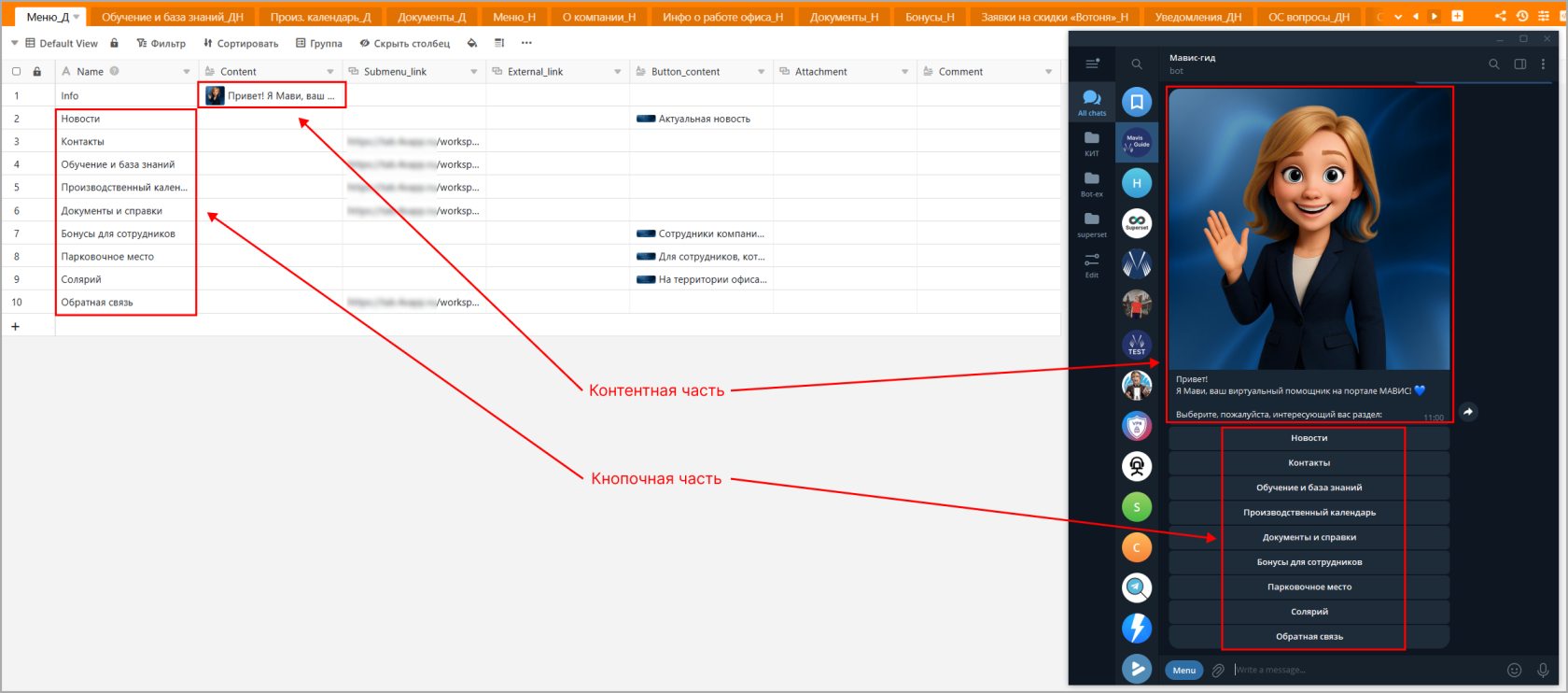
- At the top is the content part — an illustration and text. In the content management table, this part is set in the cell at the intersection of the Content column and the Info row.
- At the bottom are the menu buttons. In the content management table, the button names are in the Name column below Info.
Each submenu is a separate table with the same structure. Moving into a submenu is essentially switching the table from which the bot renders the screen.
Example. The illustration, its caption, and the buttons are passed from the table into the bot.
Three types of buttons in the menu:
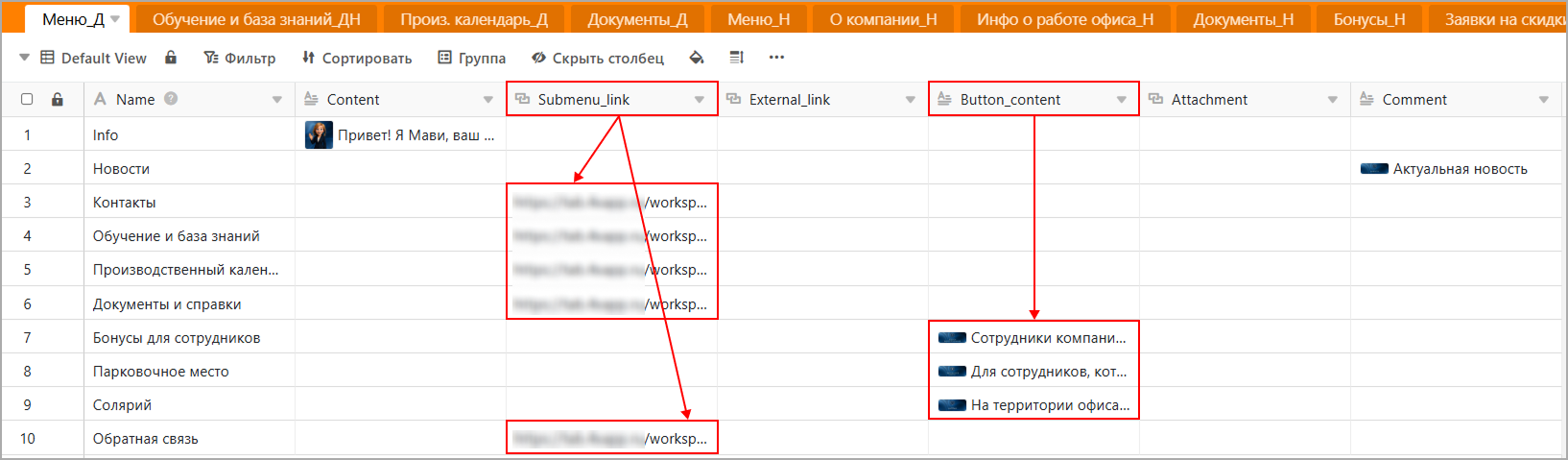
- Submenu (Submenu_link) — a nested menu. Clicking a button of this type drops the user into a menu one level lower, which is organized on the same principle — content (illustration and text) and buttons.
- Link (External_link) — an external link to a site, form, document, etc. Clicking a button of this type takes the user to the specified external link.
- Content (Button_content) — content under the button. Clicking a button of this type delivers content to the user in the form of a post — an illustration and text. Additionally, a file can be attached to this post. To do this, you need to add a file to the attachment column (Attachment).
The button type is determined by which field in the row is filled. The check priority is Submenu_link, then External_link, then Button_content. This gives the HR manager flexibility: there's no need to specify the type explicitly — everything is determined by the fact of which cells are filled.
Example. Buttons that lead into a submenu, and buttons that contain only content:
Example. Buttons with links:

Based on this data model, I developed a platform where content is fully edited through tables. The user clicks buttons in the bot, the program calls Seatable via the API, retrieves the content, and renders the requested menu with up-to-date content to the user. Watch the video of how it works:
Service architecture
Schematically, the service is structured like this:
[HR manager] → [Seatable] ← [Python bot (aiogram)] → [Telegram] → [Employee]The HR manager works only with tables. The developer does not participate in this flow. The Python bot reads the tables through the API and renders messages from them into Telegram.
Technology stack
- Python 3.12 — the main language of the project.
- aiogram 3.x — an asynchronous framework for Telegram bots.
- Seatable — storage for content and data in the form of tables.
- aiohttp — an asynchronous HTTP client for working with the Seatable REST API.
- cachetools — caching of authorization data with a TTL policy, to offload the table's API on frequent requests.
- SQLite — storage of FSM state: menu navigation, form filling. The FSM is kept in RAM and written to SQLite when the program stops.
- asyncio — background task schedulers for sending pulse surveys.
- logging — standard logging with file rotation and masking of user data in messages.
- Docker — build and run.
Programming patterns
-
Finite state machine (FSM). For menu navigation and form filling, a custom StateManager is used, which keeps each user's state in RAM and writes it to SQLite when needed. Each user is a dictionary with the current menu, navigation history, and form data. This approach lets the user continue the session after a bot restart from the point where they left off.
-
Navigation stack. The history of transitions between menus is kept as a stack — when a button is pressed, the current node is placed into navigation_history, and when going back, it is taken from there. This provides a universal "Back" button that works at any depth of the tree, regardless of the structure of a particular section.
-
Data-driven UI. Keyboards and message contents are not hardcoded in the code but assembled from table rows. The same handler renders a menu of any nesting level.
-
Field priorities instead of an explicit type. The button type (submenu / external link / content) is determined by the fact of which cells are filled, in priority order. The HR manager doesn't need to specify the button type — it's enough to fill in the necessary field.
-
Middleware for cross-cutting logic. Access checks, role determination, and logging are moved into a separate layer from the handlers.
-
Cache with TTL. Frequently requested data is cached for an hour via TTLCache from cachetools. This removes load from the API on frequent requests.
-
Retries with exponential backoff. The creation of survey tasks in Seatable is wrapped in a retry loop — if the network blinked, the task won't be lost.
-
Schedulers on asyncio. Background tasks are implemented as separate coroutines, launched at bot startup via asyncio.create_task. When the bot stops, the tasks are correctly cancelled and the state is saved.
-
Masking of user data in logs. User data passes through the mask_pii utility — the first three characters and asterisks make it into the file.
What was built on this architecture
- Directory — a tree with content: information about the cafeteria, the gym, parking, corporate events, etc.
- Feedback forms. A form is also a table, just with a different row schema: questions, answer options, a free-input flag. The bot itself determines what it's dealing with — a menu or a form — by the presence of markers in the Info row. Users' answers are written to a separate table specified in the form itself.
- Mailings. The list of notifications is also a table. HR prepares a notification in advance (text, image, attachment), and then through the /broadcast command selects it from the list and sends it to all employees at once or creates a delayed send for a specific time.
- Pulse surveys. Surveys are sent automatically after 1 week, 1, 3, 6 months, and a year after hiring. Survey content is also a table. The scheduler reads the task list every day and sends the corresponding survey to those whose date is due today.
Compatibility with other platforms
Initially the project was developed for Seatable, but later it migrated to another similar platform — NocoDB. The functionality stayed the same; only the API changed. The migration came down to rewriting a single client module for the API, while all the business logic — menu tree, forms, schedulers, mailings — remained untouched.
Because of Telegram's slowdown in Russia, it may be convenient to switch to another messenger. For this, it's enough to rewrite the modules that run on aiogram — the framework for Telegram bots.
Conclusion
The HR department got access to the Seatable admin panel and manages the content itself. Content updates, preparing notifications, launching surveys — all of this is done through the table without turning to a developer. The developer gets involved only when new functionality is needed — for example, a new type of bot behavior.